
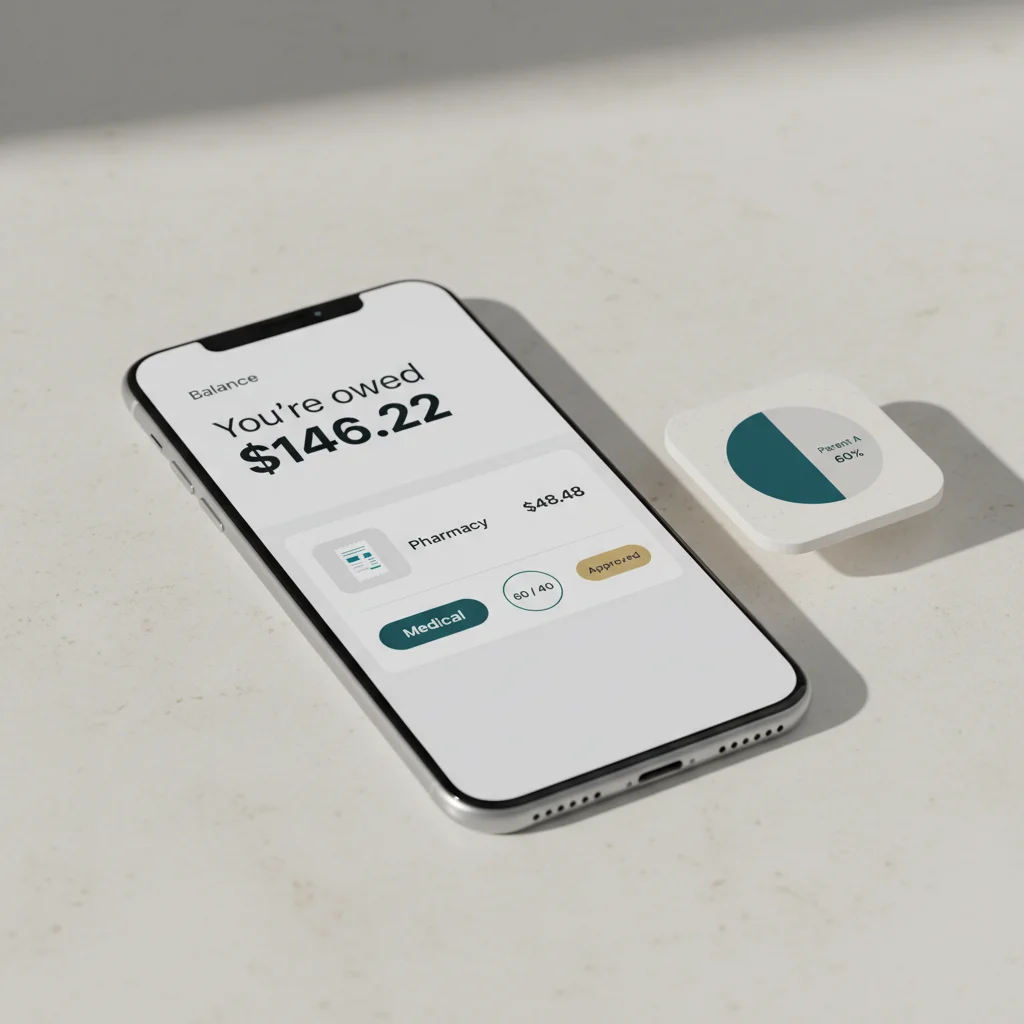
Most co-parenting apps force a 50/50 expense split, but court orders often specify other ratios like 60/40. Parenting Path lets you set custom split percentages per expense or category, upload receipts, track a running balance, and export reports both parents can review — so reimbursements match the order instead of starting a dispute.
Open any co-parenting app’s expense feature. Submit a $100 medical bill. The app splits it 50/50. You owe $50. Your co-parent owes $50.
Now open your court order. Page 12, paragraph (c): “The parties shall share unreimbursed medical expenses in proportion to their respective incomes, with Father responsible for 60% and Mother responsible for 40%.”
The app cannot do what the order says. So you end up tracking the actual split in a spreadsheet alongside the app, which defeats the purpose of using the app in the first place. A co-parenting expense tracker that does not match the ratios in your order is not really an expense tracker — it is a 50/50 calculator with a notification feature on top.
A co-parenting expense tracker is a shared ledger for child-related expenses between separated parents. The useful ones support category-specific split ratios (medical at 60/40, education at 50/50, childcare at 70/30), receipt OCR, a dispute window, a running balance, and an immutable record an attorney can use. Almost every major co-parenting app on the market today still defaults to 50/50 only, which does not match what most US court orders actually say.
Why 50/50 doesn’t match most court orders
The most common child-expense split in US family court orders is not 50/50. It is income-proportional — typically 60/40, 65/35, or 70/30 — because that is how state child support guidelines work. Forty-five states and DC use some form of the income shares model, which apportions the cost of raising a child between parents in the same ratio as their respective incomes (see the federal Office of Child Support Services overview, and any state worksheet such as the Texas Office of the Attorney General Child Support program).
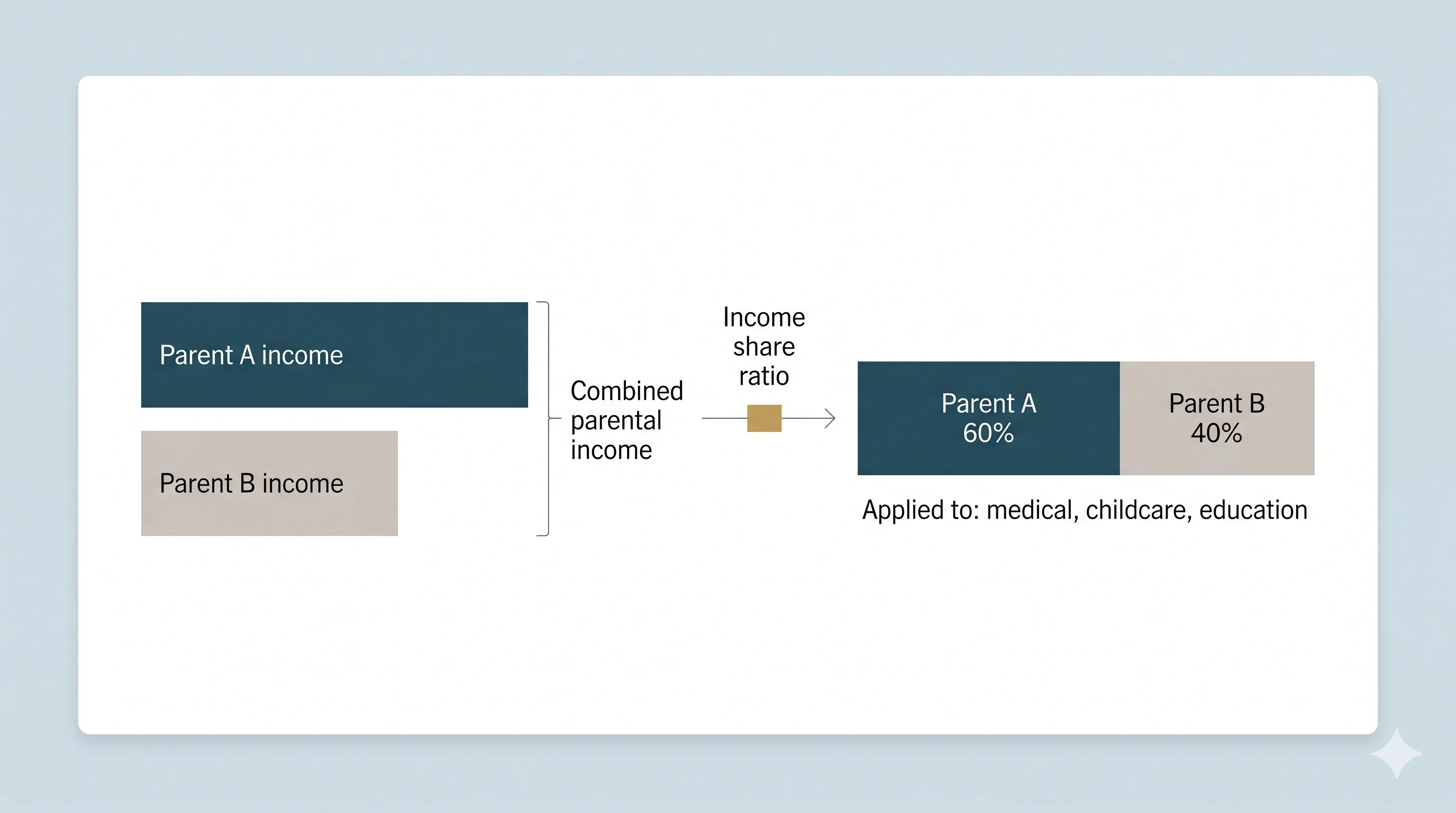
Beyond the headline ratio, most orders go further and specify different ratios for different categories of child-related expense. A typical order might look like this:
- Medical and dental (unreimbursed): Often income-proportional — for example, 60/40 or 65/35.
- Education and school fees: May be equal (50/50) or income-proportional, sometimes capped per year.
- Extracurricular activities: Often requires mutual agreement before commitment, with a specified split (commonly 50/50 if both agree, otherwise paid by the enrolling parent).
- Childcare and after-school care: Usually income-proportional and tied to either parent’s work hours.
- Clothing and necessities: Often each parent covers these during their own custody time, with no formal split.
- Travel and transportation for visitation: Sometimes paid by the relocating parent, sometimes split based on the move.
OurFamilyWizard, TalkingParents, and AppClose all default to 50/50 splits. Some allow a single global custom ratio. None support category-specific splits that match what a typical order actually says — which is why so many parents end up duplicating the ledger into a spreadsheet anyway.
What a co-parenting expense tracker should do
Strip away the marketing and there are six things a co-parenting expense tracker has to handle well for it to be worth using:
- Category-specific custom split ratios. Different categories take different ratios from the order. The tracker has to model that, not flatten it.
- Fast receipt capture. A pharmacy run with two kids does not survive a five-tap submission flow. Photo → OCR → category → submit, in under a minute.
- Notification + approval flow. The other parent sees the expense, can approve, ignore, or dispute. Silence after a fixed window counts as deemed-approved or deemed-pending depending on the order.
- A real dispute window. Either parent can dispute; both have a fixed period to resolve it; unresolved disputes become part of the record.
- Running balance and forecast. One number at the top showing net position. A projection of the next month based on recurring categories so neither parent is blindsided.
- An immutable, attorney-readable record. Receipts, ratios, approvals, disputes, and timestamps in a permanent record that can be exported for attorney review without re-keying.
How category-specific splits work in practice
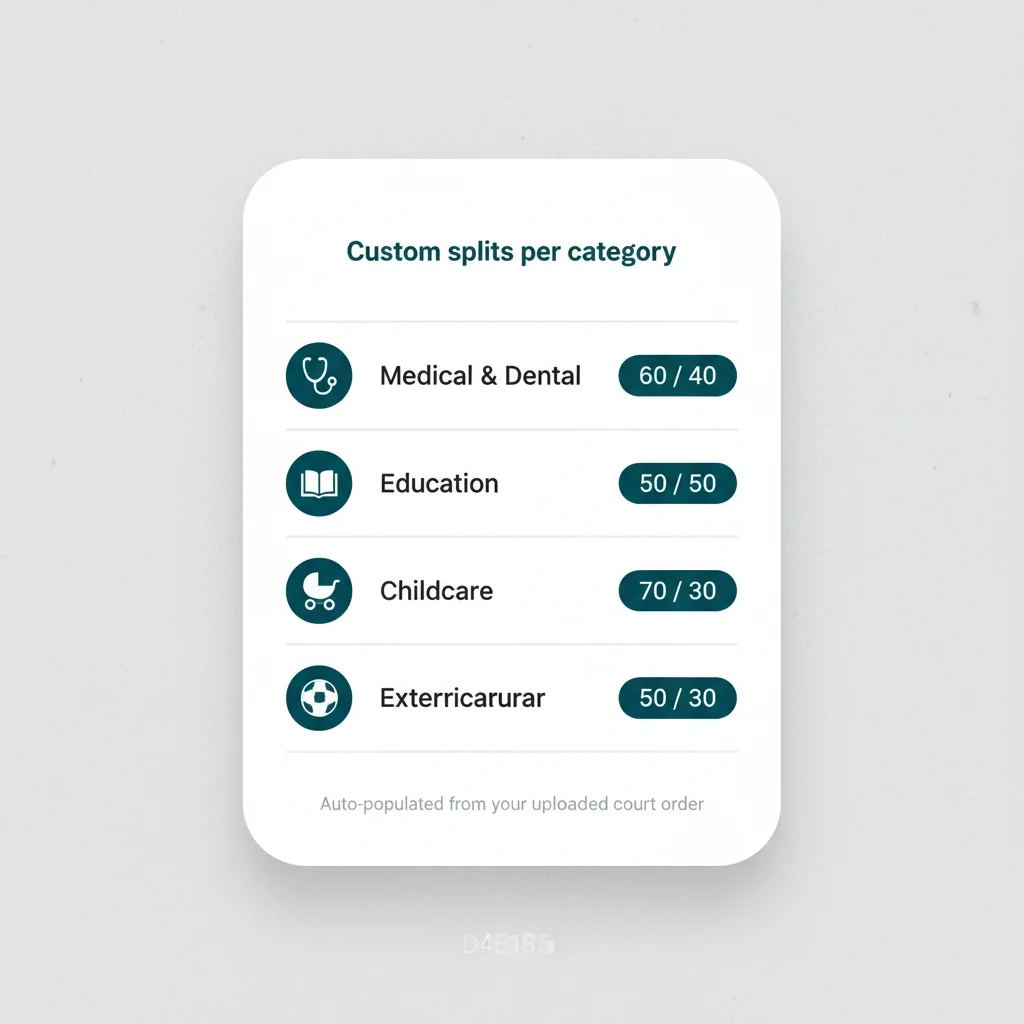
In Parenting Path, each expense category gets its own independently configured split ratio. You set it once — or let it auto-populate from your uploaded court order — and every expense submitted to that category is automatically split at the correct ratio. The product page at Expense Tracking walks through the full configuration.
When you submit a $48.48 pharmacy receipt to the “Medical” category configured at 60/40, the tracker calculates that you owe $29.09 and your co-parent owes $19.39. No spreadsheet. No mental math. No arguments about the calculation.
The same logic applies to mixed-category receipts. A $312 back-to-school invoice that includes $180 of school supplies (50/50) and $132 of after-school care (70/30) is split line by line, not lumped into a single ratio. The total each parent owes is whatever the line-item arithmetic produces, not whatever the headline category was tagged as.
Receipt OCR and EXIF stripping
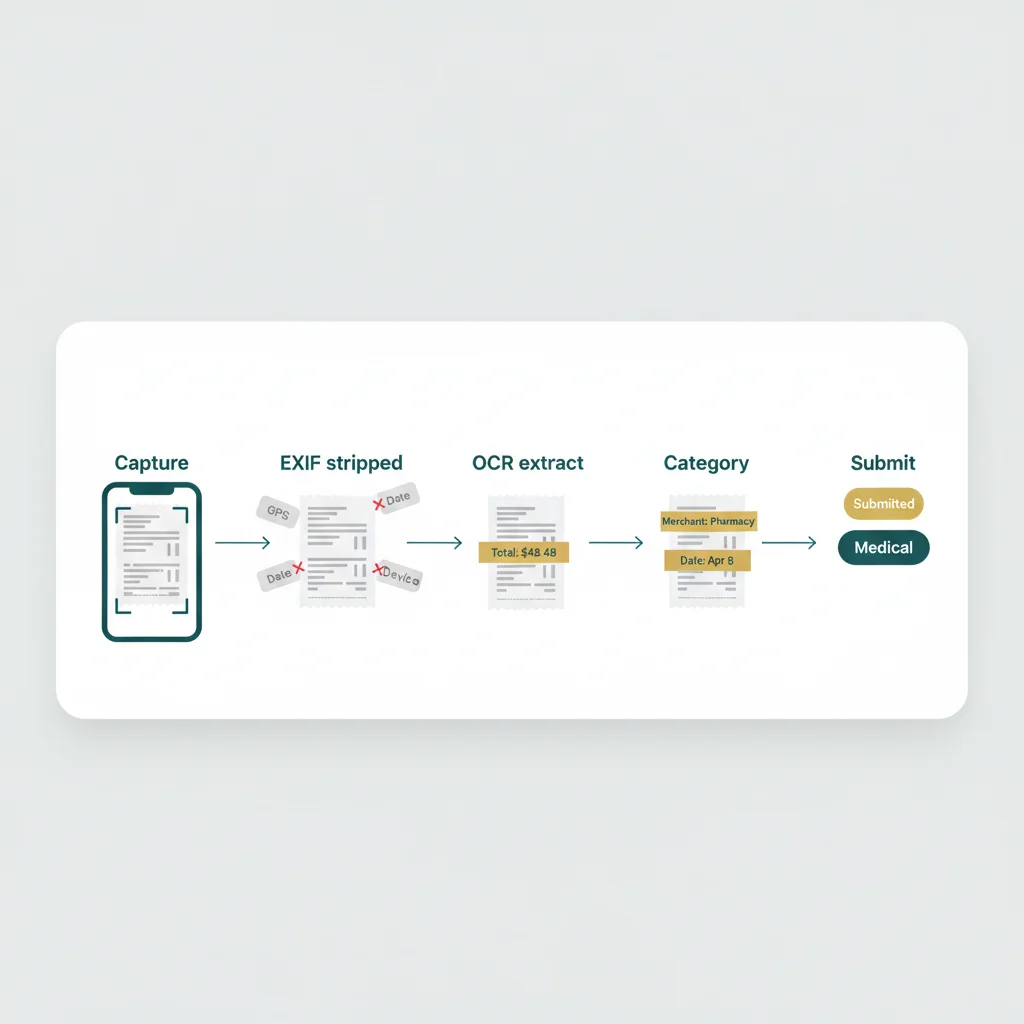
Photograph the receipt at the pharmacy counter. The tracker extracts the merchant name, date, and total automatically using OCR. You confirm the extracted values, select the category, and submit. The whole process takes under a minute.
EXIF metadata (including GPS coordinates) is stripped from every receipt photo before it reaches the server. A receipt should not reveal where you were standing when you took it. For separated parents in protective situations, this is not a small detail — this is the difference between a useful expense record and an inadvertent location disclosure.
Court-ordered to use a co-parenting app? See how custom splits, receipt OCR, and 90-second court reports fit together for court-ordered families.
For court-ordered families →The seven-day dispute window

When an expense is submitted, the co-parent receives a notification. They can approve it, dispute it, or let it stand. If disputed, both parents have seven days to resolve the disagreement inside the app. If it is not resolved in that window, the expense becomes a documented dispute on the permanent record and is available for inclusion in court reports.
The fixed window is the part most informal arrangements lack. Without a clock, disputed expenses sit in limbo for months and turn into a second disagreement layered on top of the first. A seven-day window forces resolution one way or the other, and whatever the outcome, the record captures it.
Running balance and forecast
At the top of the expense ledger, one number shows the net position across all approved and unsettled expenses. If your co-parent owes you $146.22 across this month’s medical, school, and childcare submissions, that is the number you see. No spreadsheets. No end-of-month calculations.
Based on recurring templates and historical spending patterns, the tracker also projects next month’s expected expenses by category. A predictable $480 monthly daycare invoice shows up on the forecast at the right ratio before it arrives, so neither parent is surprised by a category they already know is coming.
Parenting Path vs OurFamilyWizard, TalkingParents, AppClose
The expense-tracker capabilities that matter for matching a court order are not equally distributed across the major co-parenting apps. Independent reviews on the App Store and platforms like SiteJabber and Trustpilot consistently flag the 50/50-only limitation as a top complaint about legacy tools. Here is how the four platforms compare on the features that actually map to a typical income-shares order:
| Capability | Parenting Path | OurFamilyWizard | TalkingParents | AppClose |
|---|---|---|---|---|
| Per-category custom split ratios (medical 60/40, education 50/50, etc.) | Yes | No (single global ratio) | No (50/50 only) | No (50/50 only) |
| Receipt OCR capture | Yes | Partial (manual entry primary) | No | Partial |
| Auto-populate splits from uploaded court order | Yes | No | No | No |
| Fixed-window dispute flow with documented outcome | Yes (7-day) | Partial | Partial | No |
| Expense data inside an attorney-ready court report | Yes (Pro) | Add-on cost | Add-on cost | No |
| EXIF/location strip from receipt photos | Yes (every plan) | No | No | No |
For a deeper breakdown of price, features, and review history, see Parenting Path vs OurFamilyWizard and the wider 2026 review at the 6 best co-parenting apps in 2026.
What is available on each plan
- Free: Submit and view expenses, 50/50 split only, permanent record, EXIF stripping on receipt photos.
- Standard: Custom split ratios per category, receipt OCR, recurring templates, monthly forecast, one uploaded court order.
- Pro: Everything in Standard plus expense data in court reports, attorney/mediator portal access, dispute resolution mode, and unlimited court orders.
See full pricing details. Parenting Path bills one subscription per family rather than per parent, which is the largest single price difference against OurFamilyWizard’s per-parent model.
A note on taxes, Form 8332, and child support
Expense tracking is not the same as tax planning or child support modification, and a co-parenting expense tracker does not replace either. Two specific things parents often confuse:
- The IRS dependency rules are separate. The custodial parent generally claims the child as a dependent. The non-custodial parent can claim the child only if the custodial parent signs IRS Form 8332 releasing the exemption for that year. A co-parenting expense tracker records who paid which child expenses; it does not change which parent claims the child on a return.
- Child support is calculated separately from reimbursed expenses. Monthly child support is set by the underlying order. The tracker handles the add-on categories the order specifies (medical, education, childcare, extracurricular), not the base support number itself.
For guidance specific to your jurisdiction, search the ABA Section of Family Law directory or consult a licensed family-law attorney.
This article is for informational purposes only and does not constitute legal, tax, or financial advice. Consult a qualified family-law attorney for guidance specific to your court order, and a licensed tax professional for guidance specific to IRS Form 8332 or dependency rules.
Frequently asked questions
What is a co-parenting expense tracker?
A co-parenting expense tracker is a shared ledger used by separated parents to record child-related expenses, split them at a ratio that matches the court order (often 60/40 or another income-proportional split rather than 50/50), notify the other parent for approval, and produce a permanent record for attorney or court review. The best trackers support category-specific ratios, receipt OCR, dispute windows, and a running balance.
How are unreimbursed medical expenses split between co-parents?
In most US states, unreimbursed medical and dental expenses for a child are split in proportion to each parent’s income rather than 50/50. The exact ratio comes from the state child support worksheet that produced the underlying order. A co-parenting expense tracker that supports category-specific custom splits can apply the court-ordered medical ratio (for example, 60/40) automatically to every submitted receipt.
Does a co-parenting expense tracker work with the IRS dependency rules?
Expense tracking and tax dependency are separate questions. The IRS uses Form 8332 to release the dependency exemption from the custodial parent to the non-custodial parent for a given tax year. A co-parenting expense tracker records who paid which child expenses and at what ratio, which can help your attorney or accountant reconcile annual reimbursements, but it does not change IRS rules about which parent claims the child.
Can a co-parenting expense tracker handle different splits for different categories?
Most legacy co-parenting apps only support a single 50/50 split or one global custom ratio. Parenting Path supports a different ratio for every category — for example, medical at 60/40, education at 50/50, childcare at 70/30 — so the tracker matches what the court order actually says rather than forcing parents to do mental math or maintain a side spreadsheet.
What happens if my co-parent disputes an expense?
When a submitted expense is disputed, both parents have a fixed window (in Parenting Path, seven days) to resolve the disagreement inside the app. If the dispute is not resolved in that window, the expense becomes a documented dispute on the permanent record and is available for inclusion in court reports. Nothing about the original receipt or who-paid-what is lost — the dispute attaches to it directly.
Start free. Safety features included on every plan.
Parenting Path is launching on iOS and Android. Be first in line.
Join the waitlist